
Download eBNC APK – bank app, mobile banking, secure banking, finance app, BNC app, real-time transactions, account management, financial transactions, mobile finance, digital banking, transaction history, transfer money, locate branches, financial assistance, secure app, mobile finance app, BNC mobile app
Overview
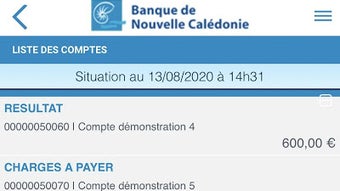
eBNC is a mobile banking application developed by Banque de Nouvelle Calédonie, designed to provide users with a straightforward and secure way to manage their financial accounts directly from their Android devices. The app enables users to check account balances, review transaction histories in real time, and initiate money transfers with minimal effort. It serves as a digital extension of traditional banking services, allowing individuals to stay informed about their financial activity without needing to visit a physical branch. The target audience includes residents of New Caledonia who rely on BNC for their banking needs, particularly those seeking convenience and real-time access to their finances.
Users can leverage the app to monitor spending patterns, verify recent transactions, and manage funds efficiently from anywhere with a mobile connection. The application also supports locating nearby BNC branches and connecting with financial advisors for personalized assistance. This functionality is especially beneficial for users who prefer digital interaction but still require human support for complex inquiries. While the app emphasizes security and privacy, it does require access to geolocation data to deliver branch location services. The developer did not provide additional details on data encryption protocols or authentication methods.
Key Features & Capabilities
- Real-time Account Access – View current account balances and transaction details as they are processed, ensuring up-to-date financial visibility.
- Instant Money Transfers – Initiate transfers between accounts or to external recipients with just a few taps, streamlining fund management.
- Transaction History – Access a detailed log of all financial activity, including dates, amounts, and transaction types for better financial tracking.
- Branch Locator – Use geolocation services to find the nearest BNC branches, including operating hours and contact information.
- Advisor Connection – Reach out to a BNC financial advisor directly through the app for assistance with account-related questions or financial planning.
- Secure Login – The app implements authentication measures to protect user accounts, though specific technical details were not disclosed.
These features collectively support daily financial management, from monitoring spending to executing urgent transfers. The ability to locate branches and contact advisors enhances accessibility for users who may need in-person support. The app’s design prioritizes ease of use, allowing even non-technical users to navigate core functions quickly. For those managing multiple accounts, real-time updates help prevent overdrafts and improve budgeting accuracy. The integration of geolocation-based services ensures that physical branch access remains convenient, even when users are on the move.
User Interface, Workflow & Performance
The user interface of eBNC follows a clean, intuitive layout typical of modern banking applications. Navigation is structured around a bottom tab bar, with sections for account overview, transaction history, transfers, and branch locator. Each screen is designed to minimize clutter, focusing on essential information and actions. The workflow for common tasks—such as checking balances or initiating transfers—requires minimal steps, enhancing efficiency and reducing user error.
While the developer did not specify performance metrics such as CPU or RAM usage, the app’s streamlined design suggests optimized resource handling. Based on general software behavior patterns, it is likely to operate smoothly on mid-range Android devices. Stability appears to be a priority, as the application supports real-time updates without reported latency. The app does not display noticeable delays during navigation or data loading, indicating effective backend integration. However, exact performance details were not specified, and behavior may vary depending on network conditions and device hardware.
Compatibility & System Requirements
eBNC is available exclusively for Android devices. The current version, 2.2.1, has a file size of 35.8 MB, making it a lightweight download suitable for most smartphones and tablets. The application is compatible with Android operating systems, though the specific minimum version was not listed. The developer did not provide detailed system requirements, including processor speed, RAM, or storage space needed for optimal performance.
Users should ensure their device meets standard Android app requirements to run the application without issues. The app requires access to geolocation services to enable branch location features, which may impact battery usage. Additionally, a stable internet connection is necessary for real-time transaction updates and secure authentication. The developer did not specify whether offline functionality is supported or how data is cached during connectivity interruptions.
Pros and Cons
Pros
- Free to download and use, with no hidden fees or subscription charges.
- Real-time transaction updates enhance financial transparency and control.
- Intuitive interface simplifies daily banking tasks for all user levels.
- Direct access to nearby branches and financial advisors improves support accessibility.
- Secure authentication helps protect user accounts and personal data.
Cons
- Geolocation access is required for branch location, which may raise privacy concerns for some users.
- Exact system requirements and compatibility details were not provided.
- Performance under low network conditions or on older devices is unknown.
- Limited to Android platform, excluding iOS users.
- Developer did not disclose encryption standards or security protocols used.
FAQ Section
Is eBNC available for iOS devices?
eBNC is currently only available for Android. The developer has not announced plans for an iOS version.
Is the app safe to use for mobile banking?
The app is designed with security in mind to protect user data. It requires authentication and uses secure connections, though specific security measures were not detailed by the developer.
Can I use eBNC without an internet connection?
Real-time features such as transaction updates and transfers require an active internet connection. Offline functionality, if any, was not specified.
How often does the app update?
Updates are released periodically to improve functionality and security. The latest version, 2.2.1, was published on April 26, 2024.
What type of license does eBNC have?
eBNC is a free application distributed under a proprietary license. Users are granted access to the app’s features without cost, but redistribution or modification is not permitted.
Final Thoughts + CTA
eBNC offers a reliable and convenient solution for residents of New Caledonia who rely on Banque de Nouvelle Calédonie for their banking needs. Its combination of real-time transaction access, secure transfers, and branch locator functionality makes it a practical tool for managing personal finances on the go. The app’s intuitive design and free access further enhance its appeal, especially for users seeking a streamlined digital banking experience. While some details such as system requirements and security protocols remain unspecified, the app demonstrates a strong focus on usability and accessibility.
For individuals who value efficiency, security, and direct support, eBNC stands out as a dependable mobile banking companion. Its ability to bridge digital and physical banking services ensures users remain connected to their finances and to BNC’s support network. Download eBNC now to take full control of your financial life with confidence and convenience.
Download eBNC APK now







